
Hand your tax preparer one clean packet, not a shoebox.
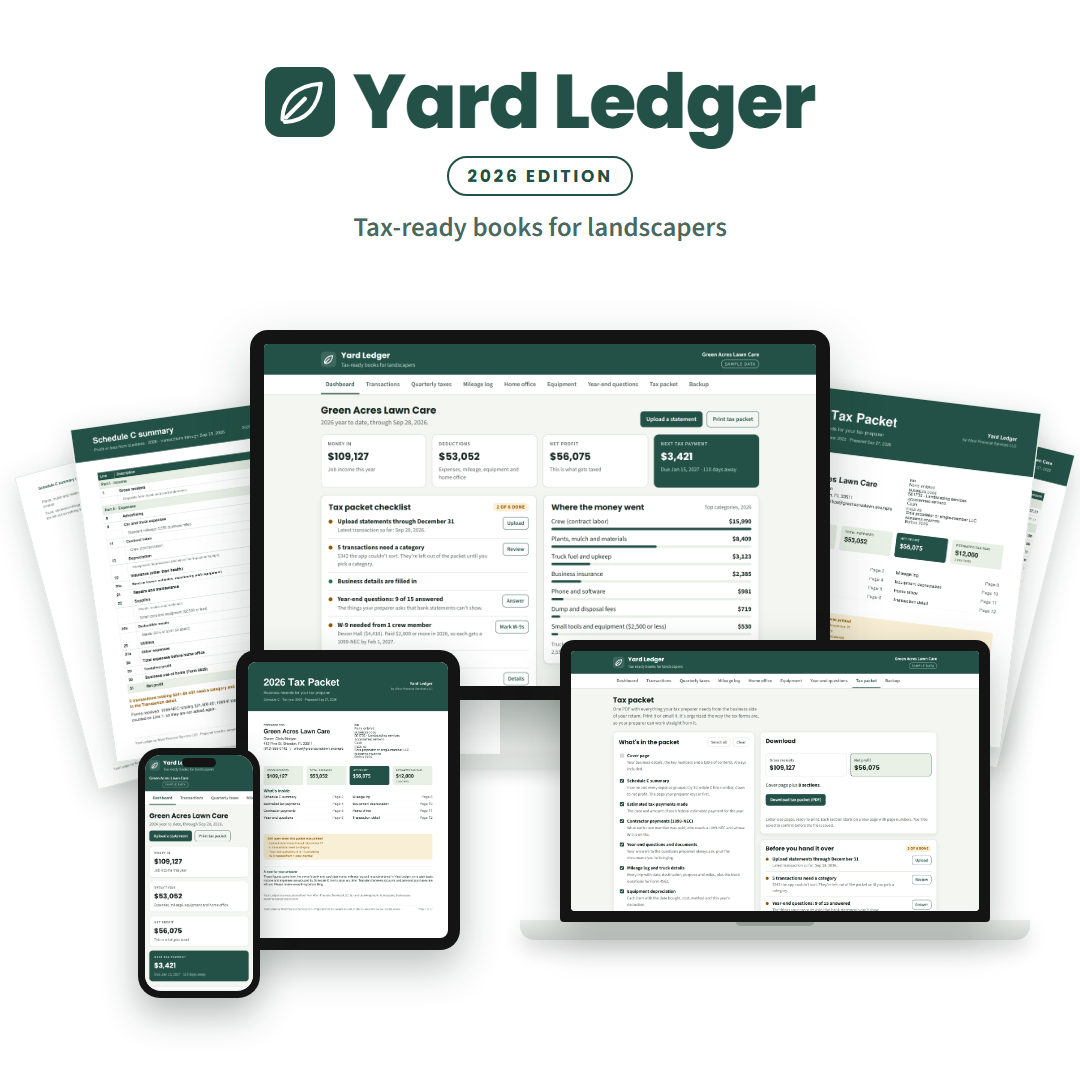
Yard Ledger sorts your bank transactions into the right tax categories, tracks your miles, equipment and home office, estimates your quarterly taxes, and prints a tax packet your preparer can work straight from.
- Built for sole proprietors and single-member LLCs
- No subscription. One payment for the whole tax year
- Works in your web browser. Nothing to install
Sound familiar?
Tax time shouldn't mean a weekend of digging through statements.
Statements everywhere
Bank, card and payment-app records in five places, and no idea which charges were for the business.
A surprise bill in April
Nobody told you what to set aside, so the tax bill shows up all at once, along with a penalty.
The same questions every year
Your preparer asks about miles, equipment and crew payments, and you're hunting for answers again.
How it works
Three steps from bank statement to tax packet
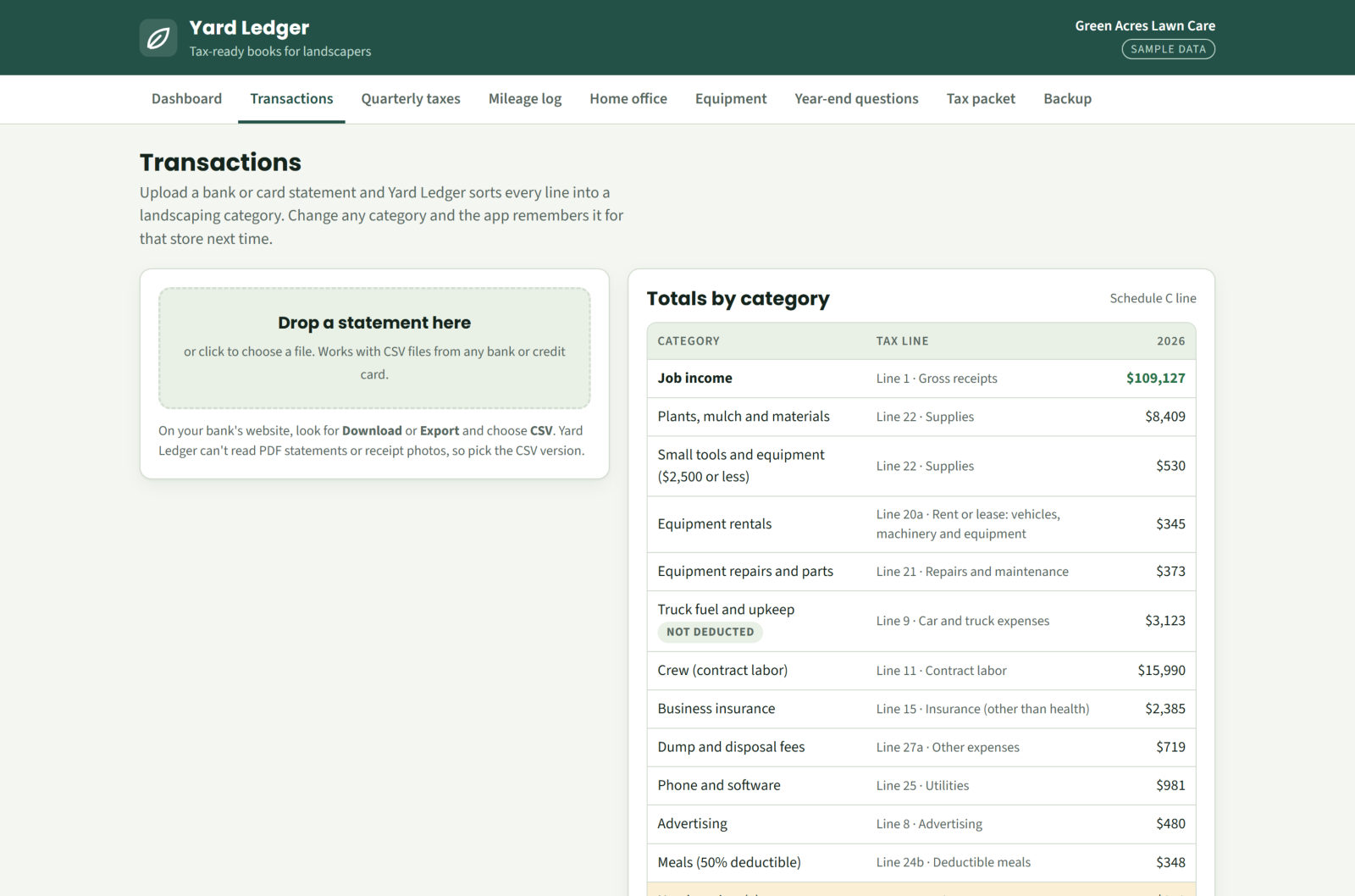
Upload your bank statement
Drop in the PDF statement from your bank or credit card website, or a CSV or QFX download. Check the lines it found, then Yard Ledger sorts every line into landscaping categories, like plants and mulch, crew, dump fees and truck fuel, each matched to its Schedule C line. Fix one charge and it remembers that store next time.
Add what the bank can't see
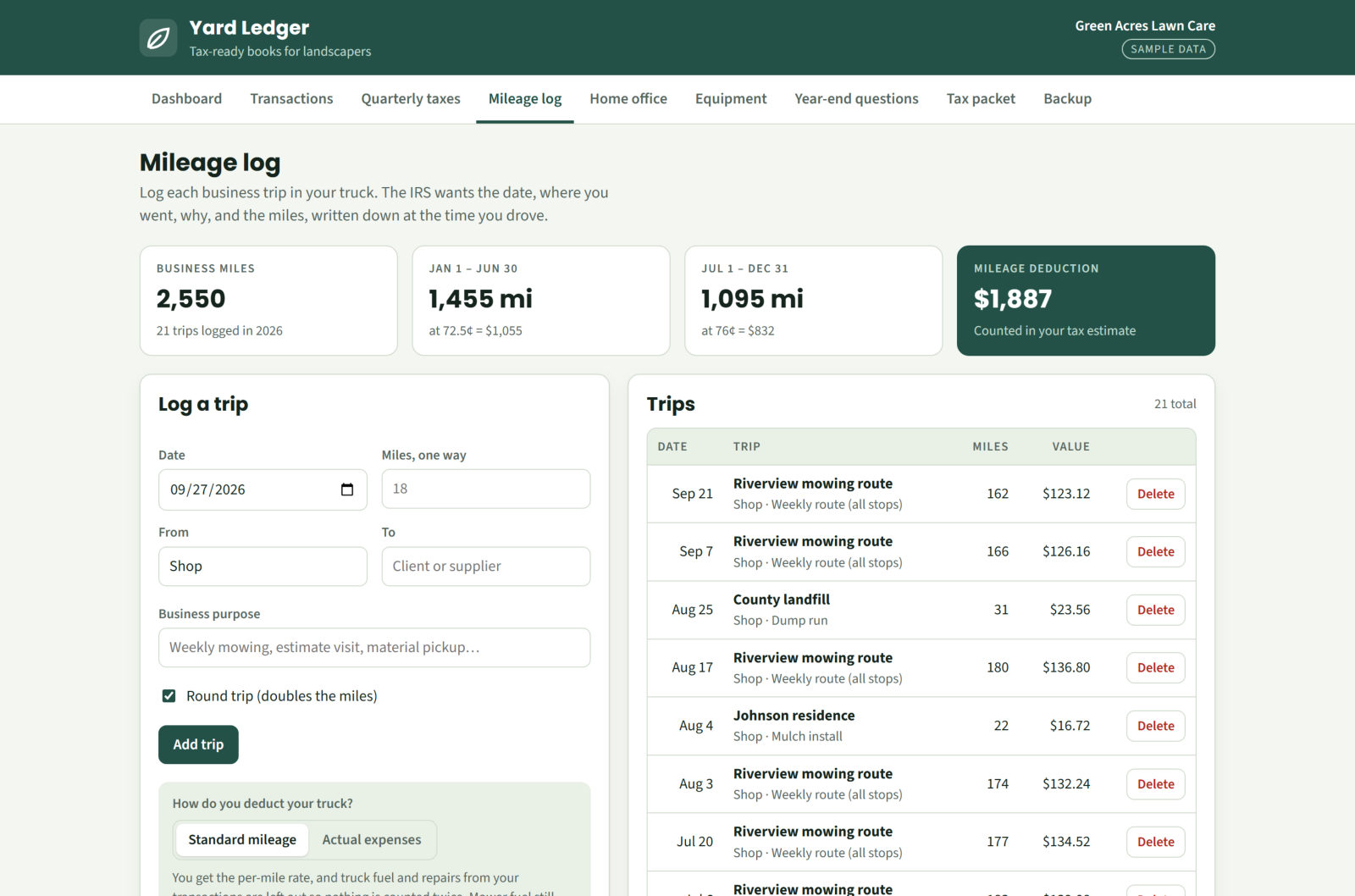
Log business miles as you drive, list equipment over $2,500, enter home office costs, and answer the year-end questions every preparer asks. Yard Ledger uses the 2026 IRS mileage rates and works out depreciation and the home office deduction for you.
Download your tax packet
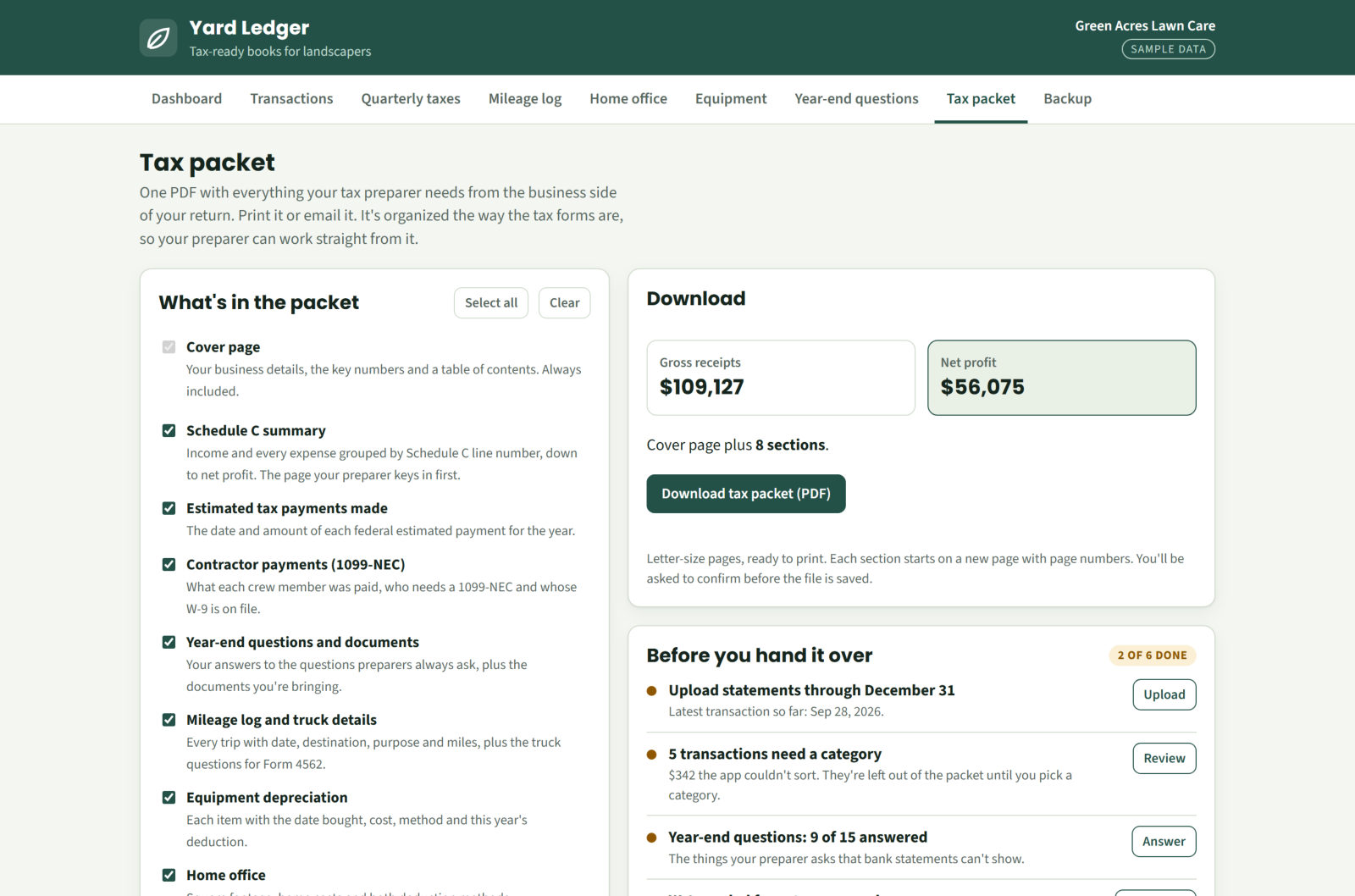
One click makes a PDF organized the way Schedule C is laid out: income, every expense by line number, estimated tax payments, contractor payments, mileage, equipment and home office. Print it or email it to your preparer.
What's inside
Everything a landscaping business needs at tax time
Built by a tax and bookkeeping firm that works with landscapers every day.
Auto-sorted transactions
Bank and card lines sorted into landscaping categories with the Schedule C line for each.
Quarterly tax estimates
What to send the IRS and when, with the 2026 due dates and a log of payments you've made.
Mileage log
Every business trip at the 2026 IRS rates, including the July 1 rate change.
Equipment depreciation
Mowers, trailers and other big purchases, deducted all at once or spread over time.
Home office
Both IRS methods worked out month by month, and the bigger deduction chosen for you.
Crew and 1099s
See who you paid $2,000 or more, who needs a 1099-NEC, and whose W-9 you have on file.
Year-end questions
The questions every preparer asks, answered once and printed with your packet.
One-click tax packet
A clean PDF your preparer can work from, with a cover page and table of contents.
Backups built in
Save a backup file with one click, protect it with a password, or turn on auto-save.
The tax packet
Your preparer will thank you
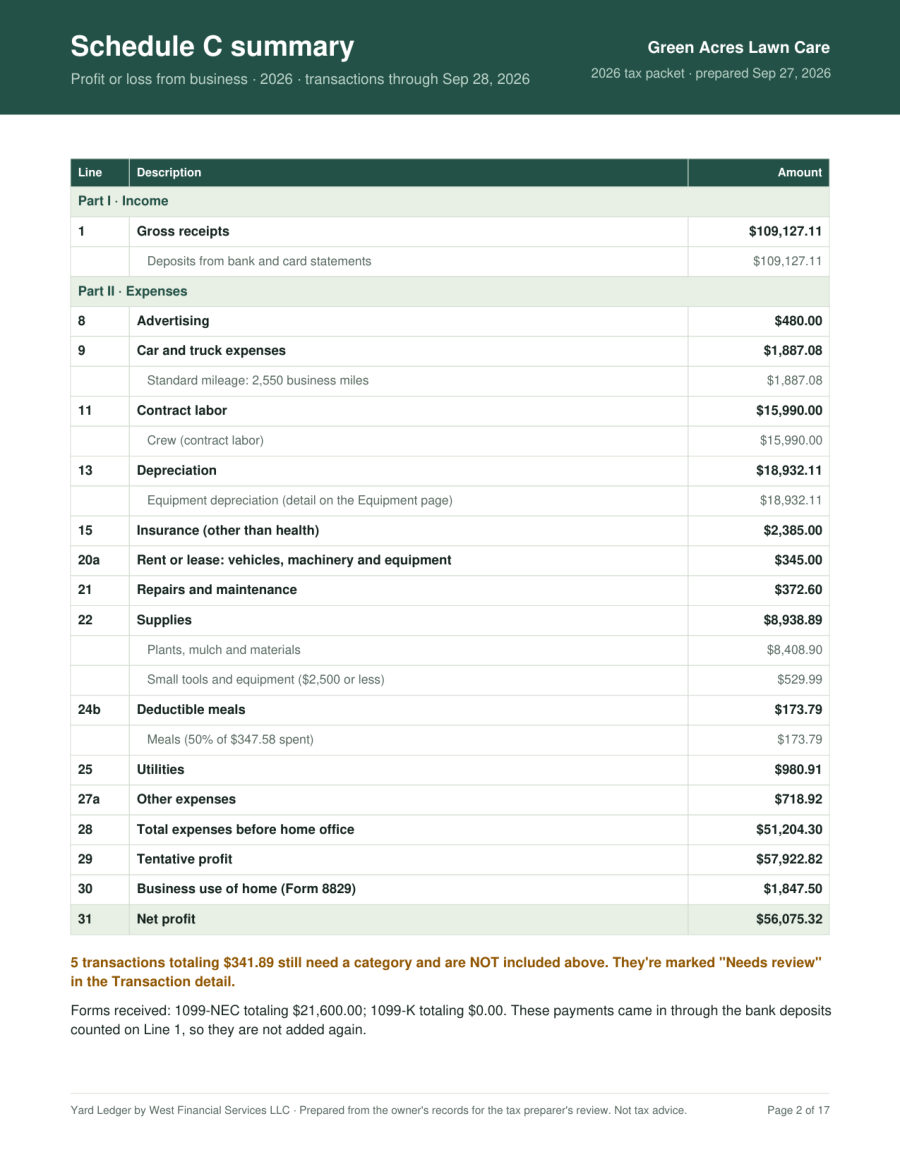
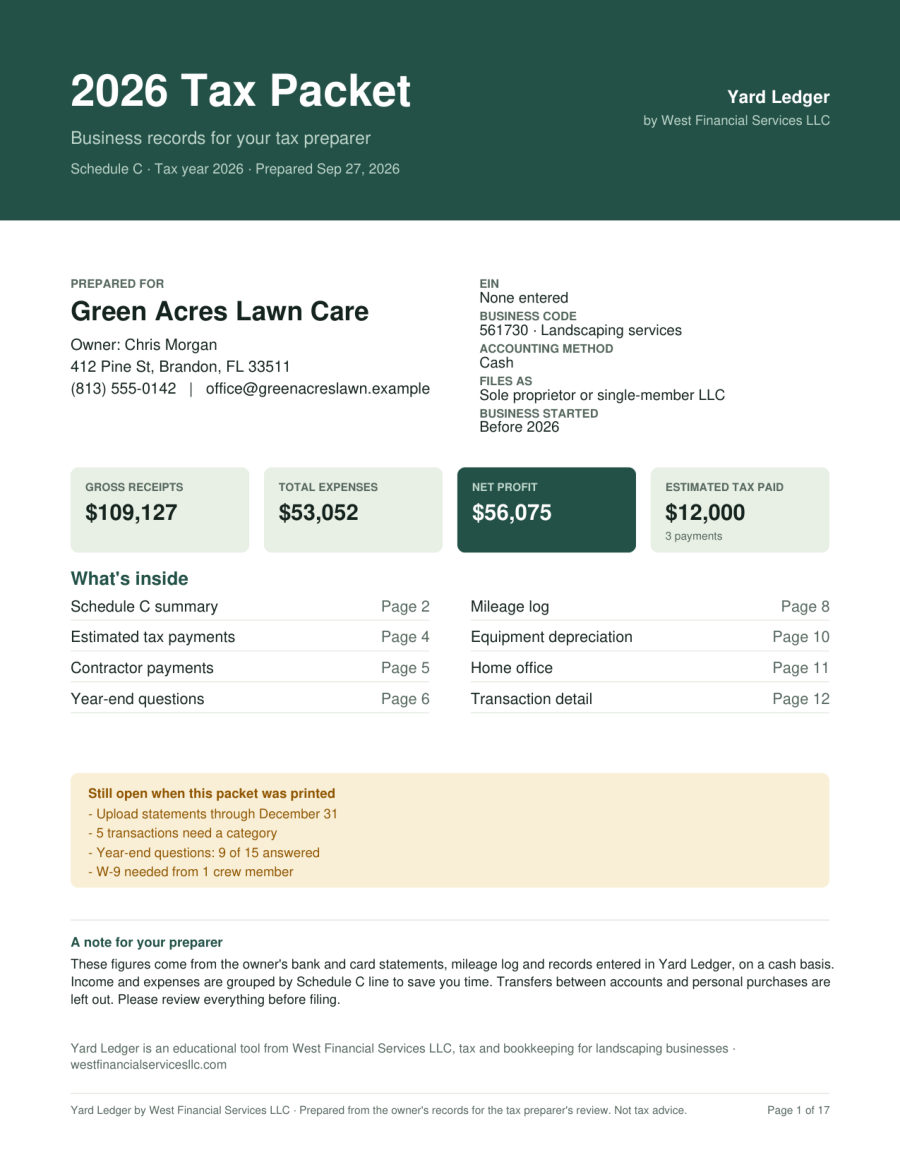
Instead of a stack of statements, your preparer gets a packet organized the way the forms are: a cover page with your key numbers, a Schedule C summary by line number, and a detail section for every deduction.
- Cover page with gross receipts, expenses, net profit and taxes paid
- Schedule C summary, line by line
- Mileage log, equipment, home office and transaction detail
- Anything still unfinished is flagged, so nothing slips through
Private by design
Your books stay on your device
Yard Ledger doesn't connect to your bank and doesn't send your numbers to anyone. Your records are saved in your own web browser, on your own computer or phone.
- No bank logins: you upload a file you downloaded yourself
- One-click backup files, with optional password protection
- Auto-save to a file on your computer in Chrome or Edge
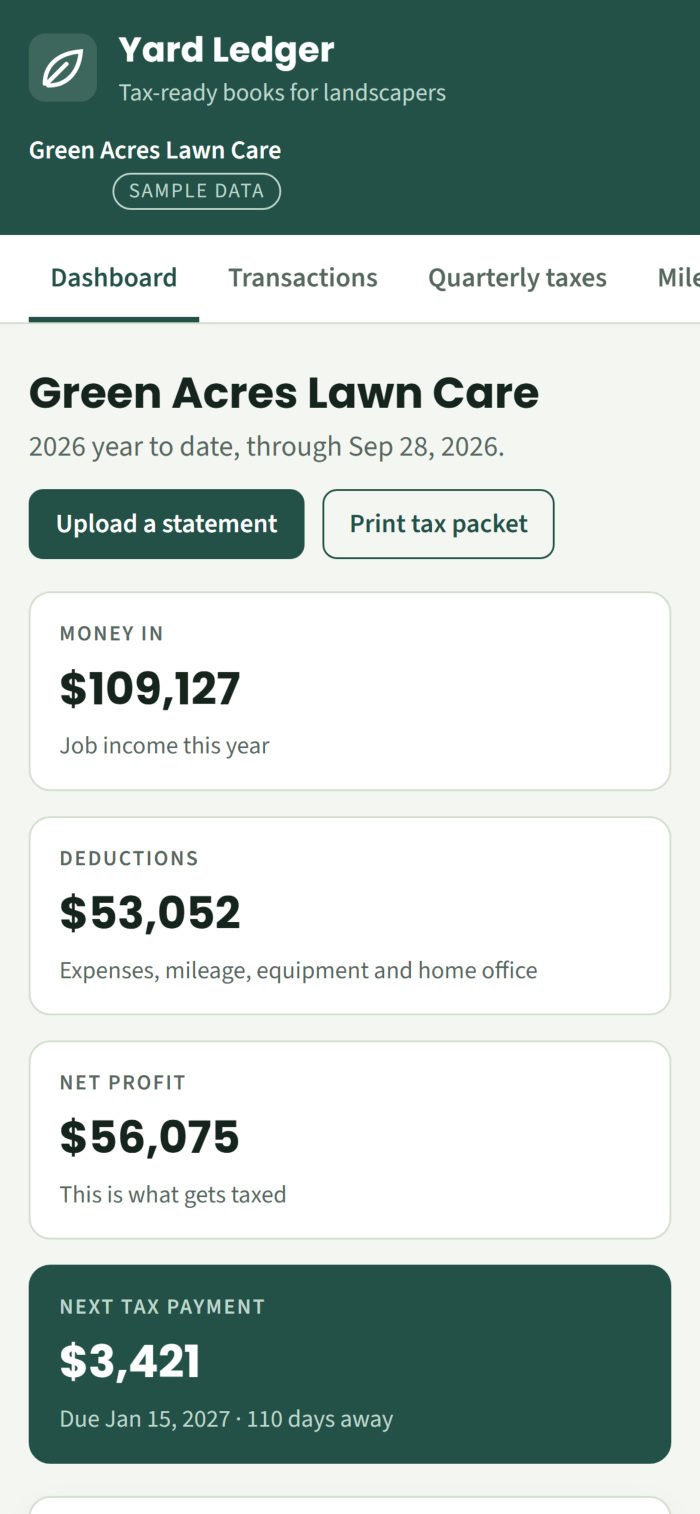
- Open it on your phone and add it to your home screen
Is it right for you?
Made for owner-run landscaping businesses
A great fit if you…
- Run a landscaping or lawn care business as a sole proprietor or single-member LLC
- File Schedule C with your personal return
- Want organized records and a clear picture of what you owe
- Do your own taxes or hand them to a preparer
Not the right tool if you…
- Are taxed as an S-Corp or partnership, or have a multi-member LLC
- Need payroll, invoicing or state tax figures
- Want your bank connected automatically
S-Corp owners: book a free discovery call and we'll talk through what you need.
Get started today
One price for the whole 2026 tax year
Yard Ledger 2026
One-time purchase. No subscription.
- Transactions, quarterly taxes, mileage, equipment and home office
- Year-end questions and one-click tax packet PDF
- Built-in backups and password-protected backup files
- Works on computer, tablet and phone
- Instant access by email after checkout
Secure checkout through Stan.
Questions
Frequently asked questions
Is this a subscription?
No. You pay $67 once for the 2026 edition, which covers tax year 2026. A new edition comes out each January with that year's tax figures.
What do I need to use it?
A web browser and your bank or credit card statements, downloaded from your bank's website. Yard Ledger reads PDF statements, CSV files and Quicken or QuickBooks downloads (QFX, QBO). It can't read scanned paper or phone photos, so you can add those transactions by hand.
Does it connect to my bank?
No. You download your transactions yourself and upload the file. Nobody gets your bank login.
Where is my information stored?
In your own web browser, on your device. We can't see it. Because of that, keep backups: Yard Ledger reminds you, and a backup file saved to your Google Drive, OneDrive, iCloud or Dropbox folder keeps you safe even if your computer breaks.
Does it work on my phone?
Yes. Open the link in your phone's browser and add it to your home screen. Uploading bank files is easiest on a computer. Each device keeps its own books, so use backup files to move them between devices.
Will it file my taxes for me?
No. It organizes your records into a tax packet for you or your preparer and estimates your quarterly federal tax. You or your preparer still file the return.
Does it include state taxes?
No. Estimates are federal only.
I'm an S-Corp. Can I use it?
It isn't built for S-Corps, partnerships or multi-member LLCs, whose taxes work differently. Please work with a tax professional. We're happy to help on a free discovery call.
Is this tax advice?
No. Yard Ledger is an educational tool that organizes your records and gives estimates based on 2026 federal figures. Your tax preparer makes the final call on every number.
Questions first? Email hello@westfinancialservicesllc.com